Working at home is fine, but I like to get out and about and work remotely when I can. Basically anyplace with a wifi connection and a spot to plug in a laptop will work, but some places are better than others for various reasons.
Here is a list of places I frequent and what I like/dislike about them.
(In order of amount of usage)
1. Starbucks Friendship Rd - Great location, lots of plugs, never so crowded that you can't find a spot. Thins out in the evening hours. For as long as I have been going there I have never spent a dime and no staff member has ever given me any static. I don't think they care and also probably figure if I'm there long enough surely I'll eventually buy something. My fave spot.
2. Spout Springs Rd Public Library - Another excellent location. There is a nice big table all the way to one side of the building with a plug. It is very quiet in this space so I use it when the work I'm doing is a little more thought intensive.
2.5 Duncan Creek Public Library - Great spot, very futuristic, lots of plugs, and some of the seating is actually soft! Haven't been going there much because there is a construction detour on the way there which makes me go way out of the way at the moment, but I'll put it back in the rotation once construction is completed.
3. Barnes and Noble Mall of Georgia - It's okay, not the best space. You have a choice of sitting at the coffee bar, which has plenty of plugs but you'll be battling the gigantic bright glare from the huge windows behind you the whole time, or you can get a table facing a direction that ha no glare, but your chances are slim to find one with a plug, and the workspace is very small.
4. Starbucks Across from Mall of GA - small store, has lots of USB only plugs but not too may AC plugs. This place is always crowded so getting a small table to work at is very iffy. Parking here sucks. I think that there may be a sweet spot for working here depending on what time you use the space, but I haven't fount it yet.
5. Culvers Braselton - I found a specific table in this location that is tucked away in a corner and has it's own plug. So far I have only used this space once, and the employees didn't seem to mind. The only downside about working at this spot is that eventually you'll want to get some food because it smells pretty good. Their Pot Roast Sandwich is pretty rad. Only been here once but will def try it again.
6. Mocha Moe's Braselton - I haven't been at this spot in probably close to a year. This is an indie space where you feel sort of obligated to buy something if you're gonna use their wifi. I have never sat at a table in this space that didn't wobble terribly. Try the flatbread pizza if it is still on the menu.
7. (Planning to try) Stars and Strikes Bowling Center Buford/Thirsty Turtle Bar - I actually haven't tried working here yet, but I went on a Sunday and over half of the facility was empty. They do have free wifi, I'm just wondering if I can find a spot tucked in out of the way where it won't bother them that I'm there but not bowling. Thirsty Turtle is the bar that operates inside the bowling alley, and it is one of the last places in town where you can actually smoke inside, which is gross, but the smell hasn't been too bad when I have passed through. I'll report back once I give these spots a try.
8. Local McDonalds/Arbys/BurgerKing/Wendys - I don't really do any work at these spaces usually, but they all have free wifi so occasionally I'll login and update some of my Google Sheets that I use for personal info.
Do you know of any great free wifi spots to work from in South North Georgia? Let me know!
Thursday, August 22, 2019

Wednesday, August 21, 2019
Web Development Job Search pt.1
Although things are moving along fairly well with my web development freelancing, the amount of business I am getting is not quite consistent enough for me to make plans or grow. So, I have decided to carefully begin looking into taking a job at a company or agency for front end web development. I say "looking into" because I'm kind of funny about jobs...I want to be the right fit at the right place and positoin, and when I am, I usually stay at that spot for a long time. However, this means that my search and application process is different than some folks.
Lots of people make a resume and send it out to anyone and everyone who will accept a submission, hoping that by casting a wide net they'll land in a good spot. I can'y ping pong around life that way, I have to be more precision. So my process involves carefully screening out any positions that are at all questionable regarding my current skill set, and my estimation for what I can learn and adapt to quickly.
Also, my search is actually two-fold.
While I'm keeping an eye open for "the job", I am in a position where I think what may be a better situation at forst is to take "a job."
The Job is a career type position, full time, and will be my primary employment, and possible end or at least severely back burner my web freelancing.
A Job would be a part time 20-25hrs/wk, no heavy responsibility type position that allows me to continue giving my freelance web work equal or more importance in terms of commitment level.
I haven't done this in a while so it will be a process of refreshing and learning as things have changed since the last time I applied for a job back in 2008. Hopefully the process will be fun and educational. I'm lucky that I have my freelancing to help me out while I'm looking for my next move forward.
Lots of people make a resume and send it out to anyone and everyone who will accept a submission, hoping that by casting a wide net they'll land in a good spot. I can'y ping pong around life that way, I have to be more precision. So my process involves carefully screening out any positions that are at all questionable regarding my current skill set, and my estimation for what I can learn and adapt to quickly.
Also, my search is actually two-fold.
While I'm keeping an eye open for "the job", I am in a position where I think what may be a better situation at forst is to take "a job."
The Job is a career type position, full time, and will be my primary employment, and possible end or at least severely back burner my web freelancing.
A Job would be a part time 20-25hrs/wk, no heavy responsibility type position that allows me to continue giving my freelance web work equal or more importance in terms of commitment level.
I haven't done this in a while so it will be a process of refreshing and learning as things have changed since the last time I applied for a job back in 2008. Hopefully the process will be fun and educational. I'm lucky that I have my freelancing to help me out while I'm looking for my next move forward.
Tuesday, April 9, 2019
CSS Grid
I keep hearing about how CSS Grid is going to be the future of layout. So far I have not tried it out at all, but I plan to give it a whirl soon. At the moment I'm still using Bootstrap 4 which has elements of flexbox, but I've never really dove into flexbox either. The developer who court the convention circuit seem to be really pumped about CSS Grid though, so that I where I think my energy is best pointed. The only downside of being a bit late to the game is that CSS Grid is pretty much compatible with all modern browsers at this point. My thinking in the past was, no sense developing a skill set for a framework that can't be used universally.
Hopefully I'll have some great updates soon.
Hopefully I'll have some great updates soon.
Thursday, March 21, 2019
Hey Guess What I'm Still Here!
Hi Everyone,
It's been a long time since my last post and a lot of things have changed. Let me quickly bring you up to speed.
As of June 2017 I am no longer working at LandscaperWebsites.com/Porterware. I was not fired and I did not quit. Circumstances happened that made the company no longer have the income to afford an employee, so we parted ways. It stunk to lose stable employment but I will say it was a good run and I left on good terms with the owner.
So, what have I been doing since then? First I took some time to try to figure out my next move. During that span of time, some clients that I had built relationships with over the 9 years I was at LandscaperWebsites contacted me directly and asked for some help with their websites. Since I still had access to the servers their sites are on, I was able to do a few jobs for them. It was during these jobs that I decided to try my hand at doing freelance web development, site maintenance, and some seo work. We can talk later about why it's only some seo work.
At the moment I am still kicking along doing freelance sites, consulting and general web related work, mostly with the landscaper and pest control industries. If you're interested you can view more about my website offerings at robertwilliamashton.com. Give me a shout via the contact page if you need an affordable, practical, inexpensive site for your upstart business.
It's been a long time since my last post and a lot of things have changed. Let me quickly bring you up to speed.
As of June 2017 I am no longer working at LandscaperWebsites.com/Porterware. I was not fired and I did not quit. Circumstances happened that made the company no longer have the income to afford an employee, so we parted ways. It stunk to lose stable employment but I will say it was a good run and I left on good terms with the owner.
So, what have I been doing since then? First I took some time to try to figure out my next move. During that span of time, some clients that I had built relationships with over the 9 years I was at LandscaperWebsites contacted me directly and asked for some help with their websites. Since I still had access to the servers their sites are on, I was able to do a few jobs for them. It was during these jobs that I decided to try my hand at doing freelance web development, site maintenance, and some seo work. We can talk later about why it's only some seo work.
At the moment I am still kicking along doing freelance sites, consulting and general web related work, mostly with the landscaper and pest control industries. If you're interested you can view more about my website offerings at robertwilliamashton.com. Give me a shout via the contact page if you need an affordable, practical, inexpensive site for your upstart business.
Wednesday, April 27, 2016
Upload and Send Folders via Google Drive
To send a folder of files it is easy and quick to use Google Drive. Google Drive gives 15 gigabytes of storage to anyone with a gmail account. Using Google Drive works great for sending folders that contain a lot of images, or any other type of files. Below are the simple instructions on using Google Drive.
Step 1.
Log in to your Gmail account. If you do not have a Gmail account, it is easy and free to create one.
Step 2.
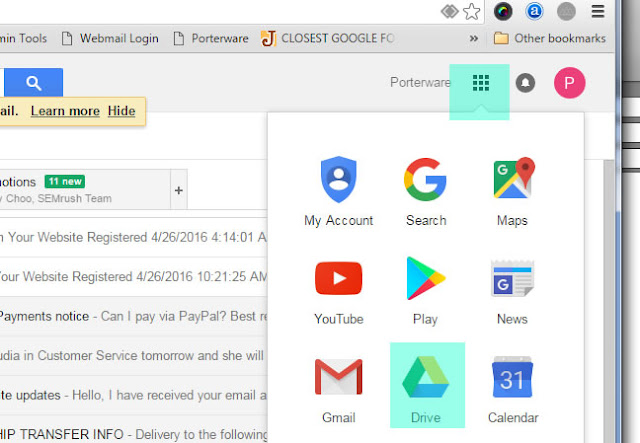
Click the app grid in the upper right corner and select Drive from the pop-up box.
Step 3.
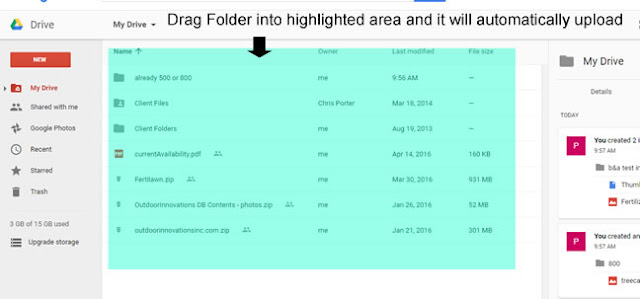
The main page of your Google Drive will open. Drag the folder that you want to share into the main area of the drive page. This will automatically upload the folder to your drive and you will see the progress in the lower right corner.
Step 4.
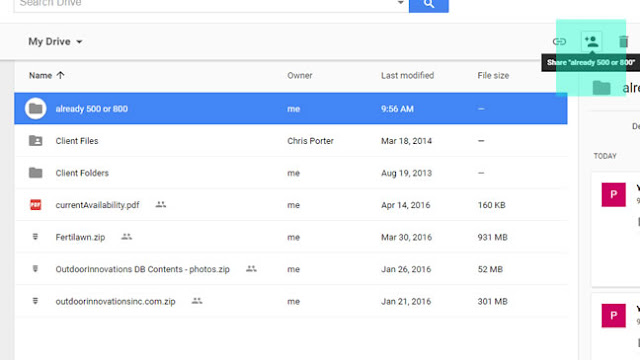
When upload is complete, click on the uploaded folder to highlight it. When it is highlighted you will see an icon that looks like a person with a + sign in the upper right. This is the "Share" icon. Click the Share icon.
Step 5.
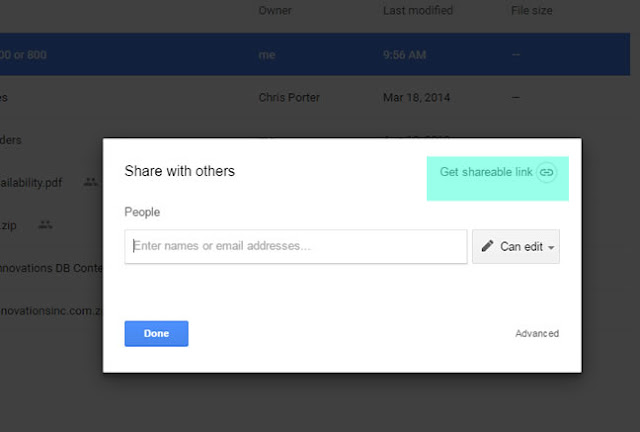
A pop-up box will open. Click "Get sharable link" in the upper right corner. Copy the link and send the entire link to whoever you want to share the folder with.
That's it! Very easy and convenient.
Step 1.
Log in to your Gmail account. If you do not have a Gmail account, it is easy and free to create one.
Step 2.
Click the app grid in the upper right corner and select Drive from the pop-up box.

Step 3.
The main page of your Google Drive will open. Drag the folder that you want to share into the main area of the drive page. This will automatically upload the folder to your drive and you will see the progress in the lower right corner.

Step 4.
When upload is complete, click on the uploaded folder to highlight it. When it is highlighted you will see an icon that looks like a person with a + sign in the upper right. This is the "Share" icon. Click the Share icon.

Step 5.
A pop-up box will open. Click "Get sharable link" in the upper right corner. Copy the link and send the entire link to whoever you want to share the folder with.

That's it! Very easy and convenient.
Tuesday, May 27, 2014
Making Sure Your Website Forms Are Working
The following information is relevant to all LandscaperWebsites.com, GreenIndustryWebsites.com, and PestControlWebsites.com websites.
It is recommended that you check each form on the site at least once a week, in order to make sure you are not missing opportunities sent by potential customers. It is up to you to monitor whether the forms on your site are making it to the correct INBOX. Because there are so many variables about the local machines that receive forms, and the way their specific email clients are configured, we do not have a way to monitor that all form submissions make it to their final destination.
Step 1:
The first step to make sure you know the email address that the forms are sending to, and make sure you have access to the machine that receives email at that address. If you do not know what email address the forms are being sent to, just give us a call and we'll let you know.
Step 2:
Go to your website and fill out the form you want to test. You may want to put the words "test" in the form fields so that you'll be able to identify that it is in fact a test and not a form from an actual user. Once the form is filled out, hit the "SUBMIT" button.
Step 3:
Watch for the form to appear in the INBOX of the email account that is supposed to receive it. It should happen very quickly. If you don't see the form appear in the INBOX after about 5 minutes, then look for it in your SPAM/JUNKMAIL folder.
If the form has been sent to your SPAM/JUNKMAIL folder, consult the "Help" section of your email client for info on how to identify emails from the forms as safe/trusted senders or similar. If you cannot find this info in the "Help" section, a Google search for the info may be helpful. Basically you want to let your email client (usually Outlook) know that messages from the forms are not spam and should be sent to the INBOX.
Once you have made the adjustments, you can go back to your website and send another test. Repeat the process until you are getting the message in your INBOX.
NOTE: the amount of support we can give for your local machine is very limited. There may be cases where you need to have someone who can be on-site with you to help with local account issues.
It is recommended that you check each form on the site at least once a week, in order to make sure you are not missing opportunities sent by potential customers. It is up to you to monitor whether the forms on your site are making it to the correct INBOX. Because there are so many variables about the local machines that receive forms, and the way their specific email clients are configured, we do not have a way to monitor that all form submissions make it to their final destination.
It is very easy to make sure the forms on your website are working!
Step 1:
The first step to make sure you know the email address that the forms are sending to, and make sure you have access to the machine that receives email at that address. If you do not know what email address the forms are being sent to, just give us a call and we'll let you know.
Step 2:
Go to your website and fill out the form you want to test. You may want to put the words "test" in the form fields so that you'll be able to identify that it is in fact a test and not a form from an actual user. Once the form is filled out, hit the "SUBMIT" button.
Step 3:
Watch for the form to appear in the INBOX of the email account that is supposed to receive it. It should happen very quickly. If you don't see the form appear in the INBOX after about 5 minutes, then look for it in your SPAM/JUNKMAIL folder.
If the form has been sent to your SPAM/JUNKMAIL folder, consult the "Help" section of your email client for info on how to identify emails from the forms as safe/trusted senders or similar. If you cannot find this info in the "Help" section, a Google search for the info may be helpful. Basically you want to let your email client (usually Outlook) know that messages from the forms are not spam and should be sent to the INBOX.
Once you have made the adjustments, you can go back to your website and send another test. Repeat the process until you are getting the message in your INBOX.
If the form DID NOT reach your INBOX or SPAM/JUNKMAIL box, give us a call at 770.887.2901 and we'll run a test on our end to see if the problem is actually with the form, or with your local machine set up.
NOTE: the amount of support we can give for your local machine is very limited. There may be cases where you need to have someone who can be on-site with you to help with local account issues.
Monday, January 6, 2014
Immaculate Outdoor - Austin / Leander TX

I worked with Josh from Immaculate Outdoor, a landscaping - hardscaping company serving the Austin TX area, for a little over a year preparing his site. We took our time as he already had a previous site running, and wanted to make sure that this new site was complete in every aspect before launching. he also had a very large amount of photos to be uploaded. Of all the sites I've worked on, this is the one which has the most detailed text content. Immaculate Outdoor should do really well with this site.
Subscribe to:
Posts (Atom)